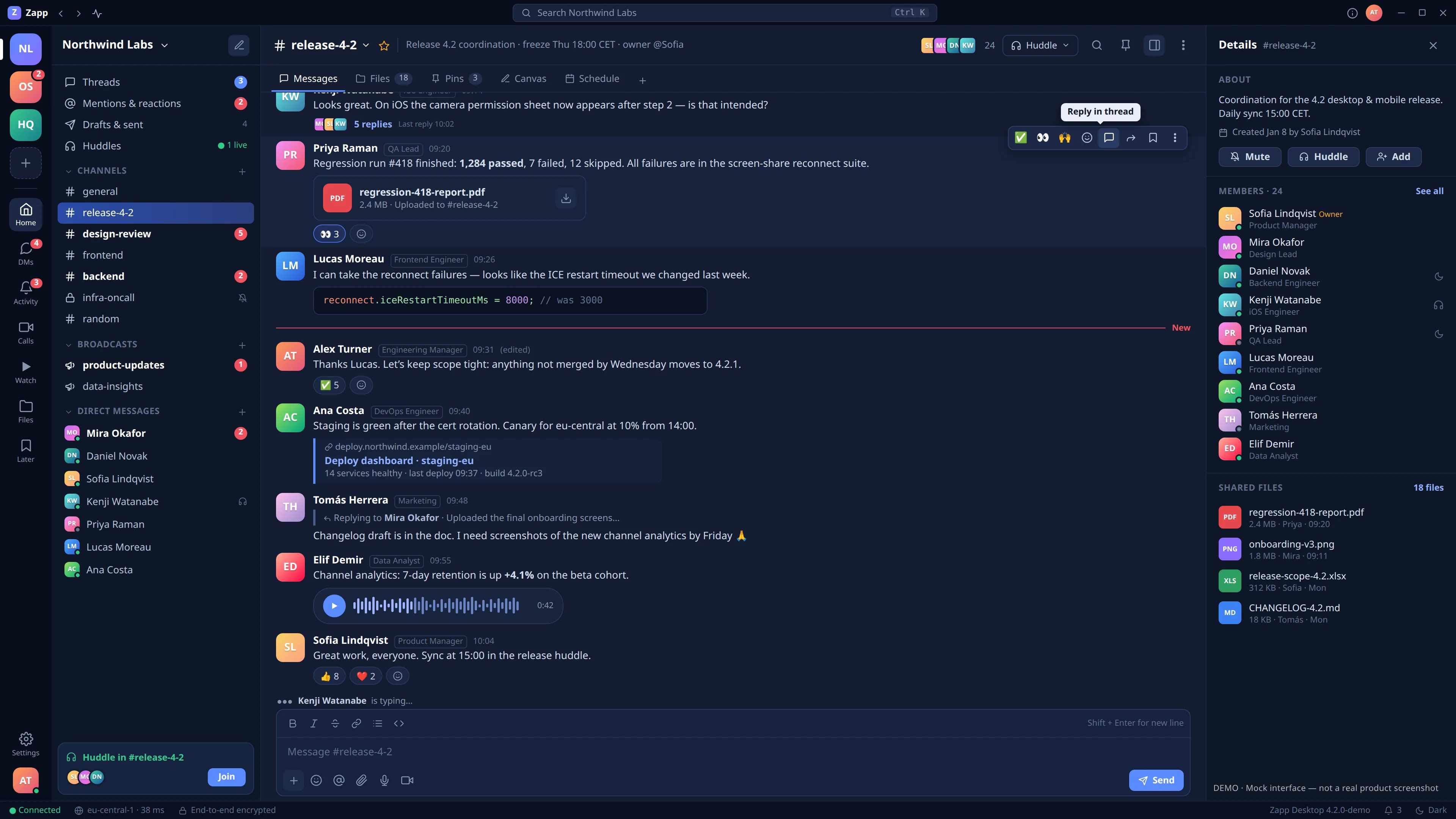
Meet Zapp, a messenger built for teamwork. Think Slack, Teams, or Discord, with the familiar messaging experience of Telegram and WhatsApp.
Chat, make calls, share your screen, record meetings, and watch videos together. Everything your team needs to stay connected, all in one place.
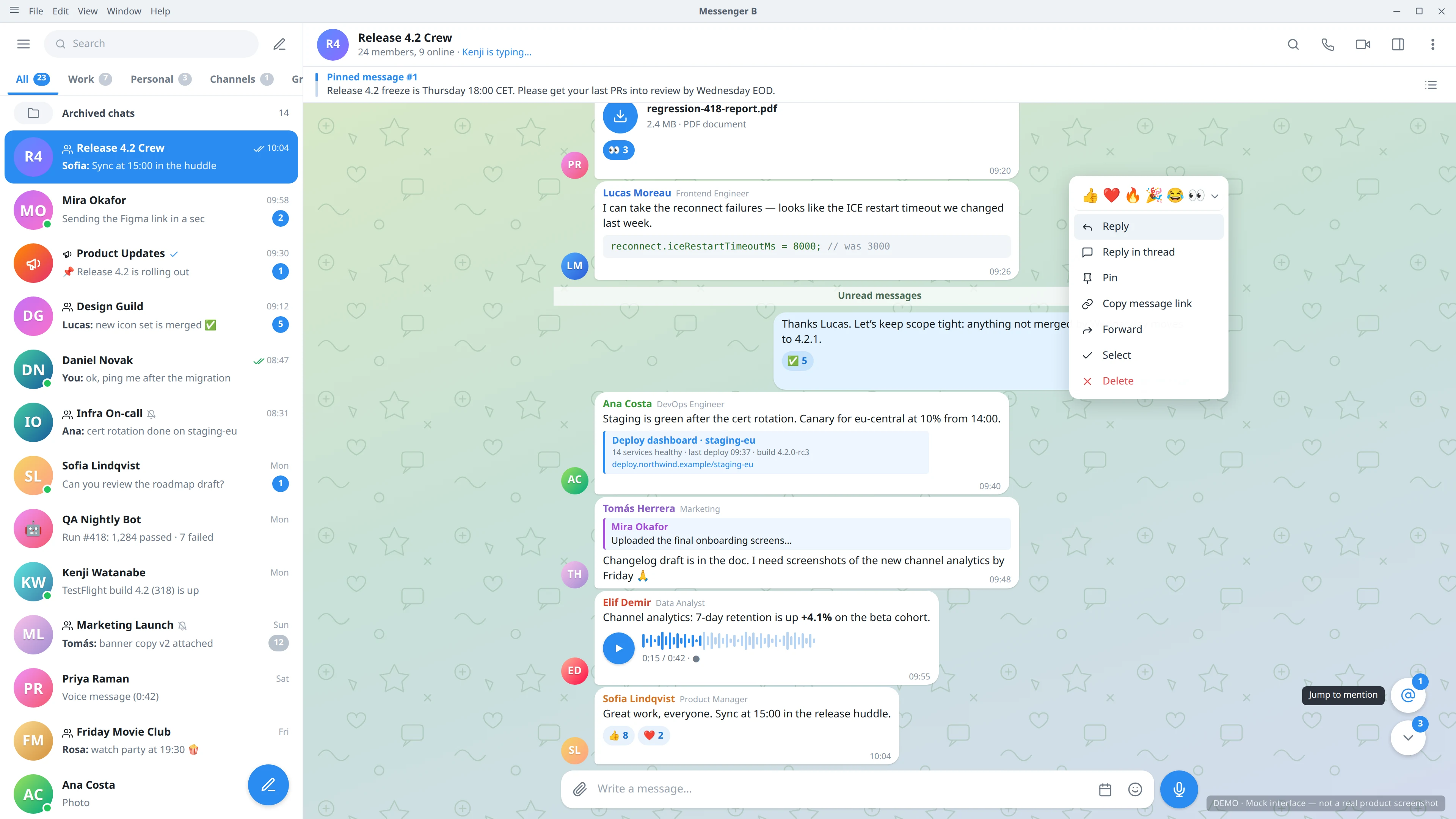
Wondering how Zapp compares to the messengers you already know? Let’s step into the ring! In the left corner, we have Zapp. In the right corner, one of its challengers. Let’s see how they match up!
Messaging
Zapp
Telegram
Compare how messages, conversations, and navigation are organized.
Had a good look at the interfaces? You can always scroll back up, zoom in, and explore every little detail.
But looks aren’t everything! Let’s see what each messenger can actually do. We’ve put together a feature comparison table just for you. Here you go!
Zapp feature comparison with other messengers
Feature
Zapp
Telegram
WhatsApp
Teams
Slack
Discord
Messaging
Supported
Supported
Supported
Supported
Supported
Supported
Calls
Supported
Supported
Supported
Supported
Supported
Supported
Screen Sharing
Supported
Supported
Supported
Supported
Supported
Supported
Call Recording
Supported
Call RecordingTelegram · Limited
Admins can record certain group voice and video chats. Native recording is not generally available for ordinary private calls.
Call RecordingWhatsApp · Not supported
WhatsApp does not provide general built-in call recording. External recording tools are not counted.
Call RecordingTeams · Supported
Teams supports native meeting recording. Availability depends on meeting permissions, organizational policies, and licensing.
Call RecordingSlack · Not supported
Slack supports audio and video clips, but does not provide general native recording of live huddles.
Call RecordingDiscord · Not supported
Discord does not provide general native recording of voice or video calls. Third-party recording bots and external tools are not counted.
Channels
Supported
ChannelsTelegram · Supported
Channels are primarily designed for broadcasting updates to subscribers.
ChannelsWhatsApp · Supported
Channels are primarily one-way broadcasts. Communities and Groups serve different purposes.
ChannelsTeams · Supported
Channels organize team conversations, files, and meetings.
ChannelsSlack · Supported
Channels organize workspace conversations, threads, files, and integrations.
ChannelsDiscord · Supported
Servers contain text and voice channels with configurable permissions.
Groups
Supported
Supported
Supported
Supported
Supported
Supported
Private Chat
Supported
Private ChatTelegram · Supported
Supports one-to-one messaging and optional end-to-end encrypted Secret Chats.
Private ChatWhatsApp · Supported
Supports private one-to-one messaging with end-to-end encryption by default.
Private ChatTeams · Supported
Supports private one-to-one and group chats.
Private ChatSlack · Supported
Supports direct messages and group direct messages.
Private ChatDiscord · Supported
Supports direct messages and group direct messages.
Video Player
Supported
Supported
Supported
Supported
Supported
Supported
Voice Message
Supported
Voice MessageTelegram · Supported
Supports recording and sending voice messages.
Voice MessageWhatsApp · Supported
Supports voice messages with recording and playback controls.
Voice MessageTeams · Supported
Supports recording and sending short audio clips.
Voice MessageSlack · Supported
Supports recording and sharing audio clips.
Voice MessageDiscord · Limited
Voice message sending is supported on mobile in eligible conversations and servers.
On-Premise
On-PremiseZapp · Supported
Deploy and run your own Zapp messaging platform on infrastructure you control, with your own server-side services and data storage.
On-PremiseTelegram · Not supported
Telegram operates as a centralized cloud service and does not offer an official self-hosted server deployment.
On-PremiseWhatsApp · Not supported
WhatsApp does not offer a self-hosted version of its consumer messaging platform. The former WhatsApp Business On-Premises API was discontinued in October 2025.
On-PremiseTeams · Not supported
Microsoft Teams is a cloud-hosted collaboration platform. Hosting certain Microsoft services or integrations on-premises does not make Teams self-hosted.
On-PremiseSlack · Not supported
Slack is a cloud-hosted collaboration platform. Self-hosted Slack apps and integrations are not equivalent to self-hosting Slack itself.
On-PremiseDiscord · Not supported
Discord does not provide an official self-hosted deployment of its messaging and voice platform.
Architecture
Bob and Alice decided to jump into a channel meeting for a quick chat. Joining is easy — just click Join in the channel.
But what’s happening behind the scenes?
Zapp deployment, from the bottom up: two Signaling nodes, then the Dispatcher, Database and S3 Storage stacked in the middle, two Media nodes and the Recorder. Bob is connected to Signaling 1 and Alice to Signaling 2; text messages pass between them through both Signaling nodes, in both directions. Both Signaling nodes talk to the Dispatcher, to the Database and to S3 Storage, and Signaling 1 to Media 1. The Dispatcher has placed their call on Media 1, so the voice goes from Bob straight to Media 1 and on to Alice, and Media 1 sends the call to the Recorder. Under the Signaling nodes is the OIDC Provider, an identity provider such as Keycloak: Bob and Alice sign in with it directly.
Zapp
Recorder
Media 1
Media 2
S3 Storage
Database
Dispatcher
Signaling 1
Signaling 2
OIDC Provider
Bob
Alice
The blue arrows show how the signaling nodes contact the Dispatcher, who makes sure Bob and Alice both land on Media 1. Without our strict Dispatcher keeping everyone in line, Bob might end up on Media 1 while Alice lands on Media 2. Same meeting, different servers. Not much of a conversation!
Alright, permission granted. Both participants are on Media 1.
Now watch the animated purple arrows. They show the voice traffic flowing between Bob and Alice through Media 1. They’re finally talking!
And what about the Recorder?
It connects to Media 1 too, capturing the meeting while Bob and Alice chat away. The purple arrows show the recording traffic as well.
And where do messages and attachments go?
S3 Storage takes care of attachments — files travel along the same blue paths until they reach their destination. Text messages follow those blue paths too, but end up in the Database, where they’re stored.
And who’s making sure Bob and Alice are actually Bob and Alice?
Meet the OIDC Provider. It authenticates our users and issues access tokens. Armed with these tokens, Bob and Alice can confidently approach the Signaling nodes.
The Signaling nodes know how to validate tokens issued by the trusted OIDC Provider. Valid token? Welcome aboard! No valid token? No entry.
Zapp on a single node: one Zapp Server runs Signaling, Media, Recording and the OIDC Provider. It exchanges signaling with the Storage block, which holds S3 Storage and the Database, exchanges signaling with Bob and Alice and carries the voice between them. There is no Dispatcher and no second Media node.
Zapp Server
Signaling
Media
Recording
OIDC Provider
Storage
S3 Storage
Database
Bob
Alice
Don’t let those big, complicated architecture diagrams scare you! We’ve got a simpler one for you.
Zapp Server can handle Signaling, Media, Recording, and OIDC Provider roles right out of the box — all in a single server process.
That means you don’t need to spread these components across multiple nodes unless you actually need to scale.
There’s just one catch: Zapp Server still needs a Database for messages and S3 Storage for attachments and recordings.
Zapp in a single VM: one Zapp VM runs Signaling, Media, Recording, the OIDC Provider, S3 Storage and the Database. It exchanges signaling with Bob and Alice and carries the voice between them.
Zapp VM
Signaling
Media
Recording
OIDC Provider
S3 Storage
Database
Bob
Alice
We can already hear your next question: “Can I run this whole thing on a single virtual machine?”
Absolutely! In fact, that’s a great way to get started. One VM is all you need.
Just don’t be too stingy with the resources!
Build the Zapp
Time to bring your first Zapp online! You’ve explored the Zapp architecture and probably have a pretty good idea of what you need.
With LLcast, it takes just three steps.
1. Planning
Start by designing your Zapp architecture. LLcast helps you put together a deployment plan using the same familiar diagrams you’ve just explored.
Zapp deployment plan: two Signaling nodes, one Media node, S3 Storage and the Database. The Signaling nodes are linked to each other and, over a shared bus, to S3 Storage, the Database and Media. Bob connects to Signaling 1 and Alice to Signaling 2, and their voice goes to Media.
Zapp
Media
S3 Storage
Database
Signaling 1
Signaling 2
BobAlice
2. Assigning
Your Zapp plan is ready. Now assign a real compute resource to each node — an instance on AWS or DigitalOcean, or one of your own servers.
Zapp deployment plan: two Signaling nodes, one Media node, S3 Storage and the Database. The Signaling nodes are linked to each other and, over a shared bus, to S3 Storage, the Database and Media. Bob connects to Signaling 1 and Alice to Signaling 2, and their voice goes to Media.
Zapp
Media
S3 Storage
Database
Signaling 1
Signaling 2
BobAlice
3. Review & Deploy
Take one last look at your setup. Need to change something? Just go back and make adjustments.
Everything looks good? Hit Deploy and grab a coffee. LLcast takes care of the rest, and your Zapp should be ready for testing in just a few minutes.
It’s time to build the Zapp of 2027!
Your own team messenger, running on your own infrastructure. Your conversations, your files, your data — all under your control. What could be better? Design your Zapp, choose your infrastructure, and bring your vision to life with LLcast.